linux服务器安装ffmpeg并封装为mcp工具
一、引言
| 之前已经在自己的笔记本电脑上装过ffmpeg命令,但是是直接下载windows适配压缩包然后添加环境变量(见[如何使用ffmpeg转换音频格式 | ~吴 银 双~](https://www.wuyinshuang.com/posts/ffmpeg-deploy/),这次需要在linux服务器上安装,然后用java代码实现mcp工具服务。 |
二、具体内容
1.下载并安装FFmpeg 静态编译包:
1
2
3
4
5
6
7
8
9
10
11
12
13
14
15
16
17
18
# 创建编译包路径
mkdir -p /usr/local/ffmpeg-static
cd /usr/local/ffmpeg-static

# 下载 FFmpeg 静态编译包
wget https://johnvansickle.com/ffmpeg/releases/ffmpeg-release-amd64-static.tar.xz

# 解压
tar -xf ffmpeg-release-amd64-static.tar.xz

# 进入解压后文件夹
cd ffmpeg-*-amd64-static

# 复制ffmpeg ffprobe到/usr/local/bin/目录下
cp ffmpeg ffprobe /usr/local/bin/

# 验证ffmpeg是否安装成功
ffmpeg -version
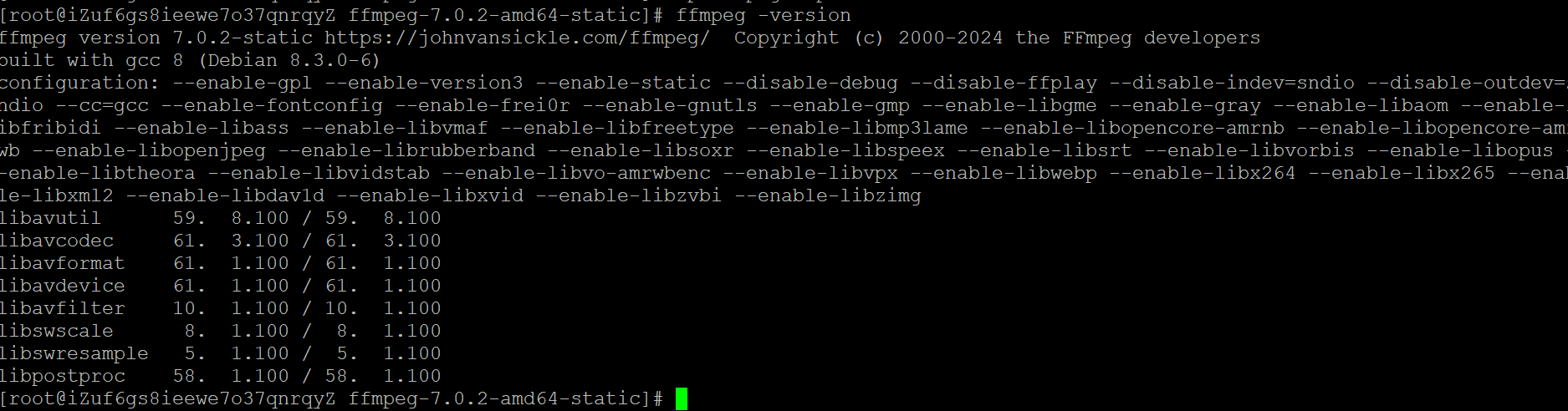
2.验证FFmpeg功能:
1
2
3
4
5
6
7
8
9
10
11
12
# 音频格式转换
# mp3 → wav
ffmpeg -i input.mp3 output.wav

# wma → wav
ffmpeg -i input.wma output.wav

# m4a → mp3
ffmpeg -i input.m4a -b:a 192k output.mp3

# wav → m4a
ffmpeg -i input.wav -c:a aac -b:a 128k output.m4a
3.开发MCP工具:
1
2
3
4
5
6
7
8
9
10
11
12
13
14
15
16
17
18
19
20
21
22
23
24
25
26
27
28
29
30
31
32
33
34
35
36
37
38
39
40
41
42
43
44
45
46
47
48
49
50
51
52
53
54
55
56
57
58
59
60
61
62
63
64
65
66
67
68
69
70
71
72
73
74
75
76
77
78
79
80
81
82
83
84
85
86
87
88
89
90
91
92
93
94
95
96
97
98
99
100
101
102
103
104
105
106
107
108
109
110
111
112
113
114
115
116
117
118
119
120
121
122
123
124
125
126
127
128
129
130
131
132
133
134
135
136
137
138
139
140
141
142
143
144
145
146
147
148
149
150
151
152
153
154
155
156
157
158
159
160
161
162
163
164
165
166
167
168
169
170
171
172
173
174
175
176
177
178
179
180
181
182
183
184
185
186
187
188
189
190
191
192
193
194
195
196
197
198
199
200
201
202
203
204
205
206
207
208
209
210
211
212
213
214
215
216
217
218
219
220
221
222
223
224
225
226
227
228
229
230
231
232
233
234
235
236
237
238
239
240
241
242
243
244
245
246
247
248
249
250
251
252
253
254
255
256
257
258
259
260
261
262
263
264
265
266
267
268
269
270
271
272
273
274
275
276
277
278
279
280
281
282
283
284
285
286
287
288
289
290
291
292
293
294
295
296
297
298
299
300
301
302
303
304
305
306
307
308
309
package com.demo.service.audio;
import con.demo.tool.McpTool
import io.micrometer.common.util.StringUtils;
import lombok.extern.slf4j.Slf4j;
import org.apache.commons.lang3.ArrayUtils;
import org.springframework.beans.factory.annotation.Value;
import org.springframework.stereotype.Service;

import java.io.BufferedReader;
import java.io.File;
import java.io.IOException;
import java.io.InputStreamReader;
import java.file.Files;
import java.nio.file.Path;
import java.util.Base64;
import java.util.Arrays;
import java.util.List;
import java.util.UUID;
import java.util.concurrent.TimeUnit;
/**
音频格式转换服务
分类:audio
</p>
@author wuyinshuang@version 1.0.0since 2026/07/15
*/
@S1f4j@service
public class AudioService {}
//支持的音频格式
private Static final List<String> SUPPORIED_FORMATS = Arrays.asList ("m4a", "mp3", "wma", "wav");
//ffmpeg执行超时时间(秒),默认5分钟
private static final long TIMEOUT_SECONDS=300;
//输入音频最大字节数,默认50oMB,超过则拒绝转换以防止内存溢出
private static final int MAX INPUT_SIZE = 500 * 1024 * 1024:
//ffmpeg可执行文件路径,可通过配置文件(ffmpeg.path)覆盖
@value("$ffmpeg.path")
private String ffmpegPath;

/**音频格式转换(Base64模式)
@param requestId ID,用于链路追踪Base64编码
@param sourceFormat 源文件格式
@param targetFormat 目标文件格式
@param audioBase64音频格式转换(Base64模式)
**/
@McpTool(
name = "audioConvert",
description = "将音频文件从一种格式转换为另一神格式,调用方直接传入音频的base64编码。支持的格式:wav,mp3,wma,m4a",
category = "audio",
inputSchema = """
{
    "type":"object",
    "properties":{
        "requestId":{
        "type":"string",
        "description":"请求 ID"
        },
        "audioBase64":{
        "type":"string",
        "description":"待转换格式的音频,输入格式:Base64编码"
        },
        "sourceFormat":{
        "type":"string",
        "description":"源文件格式,可选值:m4a,mp3,wma,wav"
        },
        "targetFormat":{
        "type":"string",
        "description":"目标文件格式,可选值:m4a,mp3,wma,wav"
        }
    },
    "required":["requestId","audioBase64","targetFormat"]
}""",
outputSchema = """
    "type": "object",
    "description":"音频格式转换结果",
    "properties": {
    "newBase64": {
        "type": "string",
        "description":"转换后的音频Base64编码"
        }
    }
}"""
)
public String audioConvert (String requestId, String audioBase64, String sourceFormat,String targetFormat){
    //1.参数校验
    if(audioBase64 == null || audioBase64.trim().isEmpty()) {
        throw new TllegalArgumentException("audioBase6s 不能为空");
    }
    if (StringUtils.isEmpty(requestId)) {
        throw new IllegalArgumentException("requestId 不能为空");
    }
    if(StringUtils.isEmpty(targetFormat)){
        throw new IllegalArgumentException("targetFormat 不能为y空");
    }
    if(StringUtils.isEmpty(sourceFormat)) {
        //源格式未传时自动解析源文件
        sourceFormat = parseFormatByBase64 (audioBase64);
    }
    sourceFormat = sourceFormat.toLowerCase ().trim () ;
    targetFormat = targetFormat.toLowerCase ().trim();
    if (!SUPPORTED_FORMATS.contains (sourceFormat)) {
        throw new IllegalArgumentExcption("不支持的源格式:" + sourceFormat +", 仅支持以下格式:"+ String.join(",", SUPPORTED_FORMATS));
    }
    if (!SUPPORTED_FORMATS.contains (targetFormat)) {
        throw new IllegalArgumentExcption("不支持的目标格式:" + targetFormat+", 仅支持以下格式:"+ String.join(",", SUPPORTED_FORMATS));
    }
    if(sourceFormat.equals (targetFormat)) {
    //格式相同,直接返回原数据(无需转换)
    return audioBase64;
    }

    //2.Base64解码
    byte[] inputData;
    try{
    String pureBase64 ;
    if (audioBase64.contains(",")) {
        pureBase64 = audioBase64.split(", ")[1];
    }else{
        pureBase64 = audioBase64;
    }
    inputData = Base64.getDecoder().decode(pureBase64);
    }catch (IllegalArgumentException e){
        throw new IllegalArgumentException("无效的Base64数据:"+e.getMessage());
    }

    //3.大小检查(防止内存溢出)
    if (inputData.length > MAX_INPUT_SIZE) {
        throw new IllegalArgumentException("输入文件过大:"+String.format("%.2f MB",inputData.length / (1024.0 *1024)) +",最大支持:" + (MAX_INPUT_SIZ /(1024.0 *1024) +"MB");
    }

    //4.执行FEmpeg转换
    byte[] outputData;
    try{
        outputData = convertAudio(inputData, sourceFormat, targetFormat);
    }catch (Exception e) {
    throw new RuntimeException("音频转换失败:"+e.getMeasage(),e);
    }
    if(outputData == null || outputData.length == 0){
    throw new RuntimeException("音频转换失败,转换后输出为空");
    }

    //5.返回Base64编码
    String newBase64 = Base64.getEncoder().encodeToString (outputData);
    return newBase64;
}

public String parseFormatByBase64 (String fullBase64){
    if(fullBase64 == null || fullBase64.isBlank()){
    return "unkown";
    }
    //1.去掉前缀
    String pureBase64;
    if (fullBase64.contains(",")) {
        pureBase64 = fullBase64.split(", ")[1];
    }else{
        pureBase64 = fullBase64;
    }
    int needByteCount = 20;
    int needBase64Char = (int) Math.ceil(needByteCount * 4.0 / 3) ;
    //2.截取头部base64字符,多余的直接丢弃不解码
    String headBase64 = pureBase64.substring(0, Math.min(needBase64Char,pureBase64.length()));
    //3.仅解码头部一小段,极小内存占用
    byte[] headBytes = Base64.getDecoder().decode (headBase64);
    if (headBytes.length < 4) {
        return "unknown";
    }
    //4.根据魔数判断格式
    //WAV RIFF 52 49 46
    if (headBytes[0] == Ox52 && beadBytes[l] == Ox49 && headBytes[2] == Ox46 && headBytes[3] == Ox46){
        return "wav";
    }
    //MP3 ID3头部
    if (headBytes[0] == Ox49 && beadBytes[l] == Ox44 && headBytes[2] == Ox33){
        return "mp3";
    }
    //M4a
    if ( headBytes.length >= 8 && headBytes[4] == Ox66 && headBytes[5] == Ox74 && headBytes[6] == Ox79 && headBytes[7] == Ox70){
        return "m4a";
    }
//WMA 头: 30 26 B2 75 BE 66 CF 11 A6 D9 00 AA 00 62 CE 6C
byte[] wmaHeader = new byte[]{
    (byte)Ox30,(byte)0x26,(byte)OxB2,(byte)0x75,
    (byte)Ox8E,(byte)0x66,(byte)OxCF,(byte)0x11,
    (byte)OxA6,(byte)0xD9,(byte)Ox00,(byte)0xAA,
    (byte)Ox00,(byte)0x62,(byte)OxCE,(byte)0x6C
}
byte[] headSlice = ArrayUtils.subarray (headBytes,0,16)
if (Arrays.equals (headSlice,wmaHeader)){
    return "wma";
}
return "unknown";
}

//执行ffmpeg音频格式转换
原音频字节数据源音频格式(如m4a、mp3)目标音频格式(如wav、mp节数据
private byte[] convertAudio (byte[] inputData, String sourceFormat,String targetFormat)
throws IOException, InterruptedException{
    Path tempDir = null;
    File inputFile = null;
    File outputFile = null;
    try{
        //1.创建临时目录,避免文件名冲突
        tempDir = Files.createTempDirectory("audio_convert_");
        String uuid = UUID.randomUUID().toString().replace("-","");
        //2.写入源临时文件(带扩展名,便于ffmpeg识别格式)
        inputFile = new File(tempDir.toFile(), uuid + "." +sourceFormat);
        Files.write(inputFile.toPath(), inputData);
        //3.构建输出文件路径
        outputFile = new File(tempDir.toFile(), uuid + " out." + targetFormat);
        //4.拼装并执行ffmpeg命令
        long startTime = System.currentTimeMillis() ;
        int exitCode = runFfmpeg (inputFile, outputFile) ;
        long duration = (System.currentTimeMillis() - startTime) /1000;
        if (exitcode != 0){
            throw new IOException("ffmpeg转换失败,退出码"+ exitCode);
        }
        if (!outputFile.exists() || outputFile.length == 0){
            throw new IOException("ffmpeg转换完成但输出内容为空");
        }
        //6.读取输出文件并返回
        return Files.readAllBytes (outputFile.toPath()) ;
    }finally{
        //7.清理临时文件
        cleanupTempFile (inputFile);
        cleanupTempFile (outputFile);
        if(tempDir !=null){
            try{
                Files.deleteIfExists (tempDir);
            }catch (IOException e) {
                log.warn("删除临时目录失败,dir={}",tempDir,e);
            }
        }
    }
}

//拼装并执行ftmpeg命令
private int runFfmpeg(File inputFile, File outputFile)throws IOException, InterruptedException {
    ProcessBuilder pb = new ProcessBuilder (
    ffmpegPath,
    "-i", inputFile.getAbsolutePath();
    "-vn"
    );
    //覆盖已存在输出文件
    pb.command().add ("-y").
    pb.command().add (outputFile.getAbsolutePath());
    pb.redirectErrorStream(true);
    Process process = pb.start();
    //读取输出日志,防止缓冲区阻塞
    StringBuilder outputLog = new StringBuilder();
    try (BufferedReader reader = new BufferedReader(
        new InputStreamReader (process.getInputStream(), StandardCharsets.UTF_8))) {
        String line;
        while ((line = reader.readLine()) != null){
            outputLog.append(line).append("\n");
            if (line.contains("frame=") || line.contains("time=")) {
                log.info("ffmpeg进度:"+line.trim();
            }
        }
    }
    boolean completed = process.waitFor(TIMEOUT_SECONDS, TimeUnit.SECONDS);
    if (!completed) {
        process.destroyForcibly();
        throw new IOException("ffmpeg执行超时(超过"+TIMEOUT_SECONDS+"秒)");
    }
    int exitCode = process.exitValue();
    if (exitCode != 0) {
    String erroeMessage =  extractErrorMessage(OutputLog.toString);
    }
    return exitCode ;
}

//从ffmpeg日志中提取关键错误信息
private String extractErrorMessage (String fullLog) {
    if (fullLog == null || fullLog.isEmpty()){
        return "无详细错误信息";
    }
    String[] lines = fullLog.split("\n");
    StringBuilder errors - new StringBuilder(
    for (String line : lines){
        String lower = line.toLowerCase() ;
        if (lower.contains("error") || lower.contains("invalid")){
            errors.append(line).append("\n");
        }
    }
    if (errors.length() > 0) {
        return errors.toString();
    }
    //没有明显错误行时,返回最后 10行
    int start = Math.max(0, lines.length - 10);
    StringBuilder tail = new StringBuilder();
    for (int i= start;i< lines.length;i++) {
        tail.append(lines[i]).append("\n");
    }
    return tail.toString();
}

//清理临时文件,失败时仅打印警告日志
private void cleanupTempFile(Filefile){
    if (file == null){
       return;
    }
    try{
        Files.deleteIfExists(file.toPath());
    }catch (IoException e) {
        log.info("删除临时文件失败,file={}",file.getAbsolutePath(),e);
    }
  }

}
三、总结
FFmpeg是权威的音频处理工具,但是要注意本地运行windows环境和linux服务器运行要安装的步骤不一样,路径也要再配置文件中变更。
作者:吴银双
日期:2026年7月24日
平台:GitHub Pages / 技术博客
本文由作者按照 CC BY 4.0 进行授权